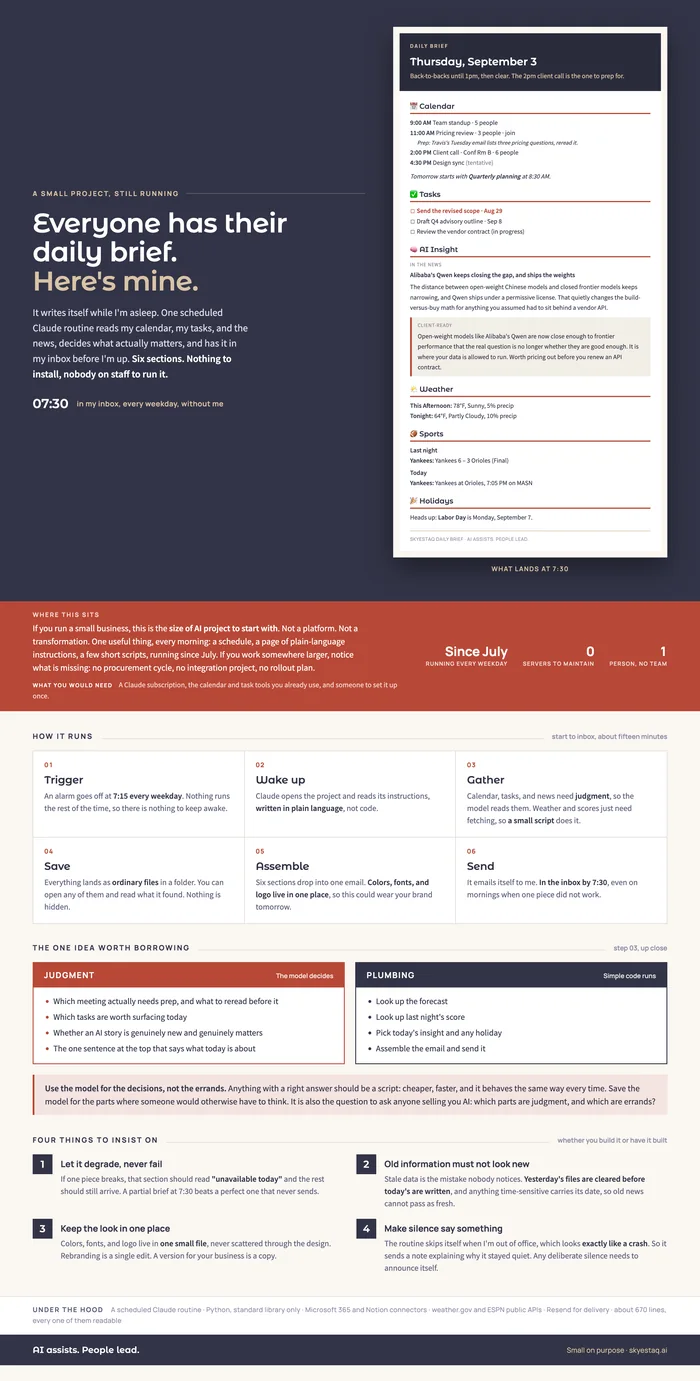
A lot of people are starting their first AI build with a daily brief. There are good out-of-the-box options that fit most needs. Mine was made in partnership with Claude, and I wanted to show how it works. Every weekday a scheduled routine reads my calendar, my tasks, and the news, decides what matters, and has six sections in my inbox by 7:30. One person, no team, no servers. The visual guide below shows what arrives, how it runs, and the one design idea I would carry into any AI project: use the model for the decisions and simple code for the errands.
The full guide
⇩Download the PDF ↗View it on the pageBuilt at full width, so it is worth opening rather than squinting at. Either version shows the whole thing.
Key takeaways
Four things worth taking from this, whether you build one yourself or have it built:
- Give the model the judgment and give scripts the errands. Which meeting needs prep is a judgment call, so the model reads the calendar. Weather and scores have a right answer, so a script looks them up. Scripts are cheaper, faster, and behave the same way every time. It is also the question to ask anyone selling you AI: which parts are judgment, and which are errands?
- Design it to arrive incomplete. If the news fetch breaks, that section reads "unavailable today" and the rest still arrives. A partial brief at 7:30 beats a perfect one that never sends.
- Old information must not look new. Yesterday’s files are cleared before today’s are written, and anything time-sensitive carries its date. Stale data is the mistake nobody notices.
- Silence has to explain itself. The routine skips itself when I’m out of office, which looks exactly like a crash. So it sends a short note saying why it stayed quiet.
What you would need
A Claude subscription or similar, the calendar and task tools you already use, and someone to set it up once. That last part is what our AI Build work is for: one useful thing, set up once, running on tools you already own.
Every article here is written to our AI standard. How we use AI →