Ask ninety-nine people to define an AI agent and you'll get a hundred answers.
That's not because ninety-nine people are behind on their reading. It's because the word itself came preloaded. Long before software borrowed it, an agent was a person who acted on your behalf and used their own judgment doing it. You give a realtor three bedrooms, a school district, and a budget. What comes back is their judgment, not just your search terms. So when tech companies started calling everything from a chatbot to a glorified macro an "agent," everyone imported their own picture of how much independence the thing actually has.
I have a definition I use with clients, and it hangs on that exact idea: how much freedom does the software have to decide? Let's start there.
So what actually makes it an agent?
Traditional software follows a recipe. Every step spelled out in advance, same result every time. That's not an insult, it's the point. Payroll should follow the recipe.
An agent is a cook. You say dinner for six, one vegetarian, nothing too spicy. The cook checks what's in the fridge, makes a substitution when the store is out of something, and decides the salmon needs two more minutes. You didn't script any of that. You gave a goal and got judgment.
Engineers call this the difference between deterministic and probabilistic software. The recipe always comes out the same. The cook makes choices.
Strip away the jargon and all software does the same two things: you put data in, you get something out. Agents are no different. What changed is everything in between.
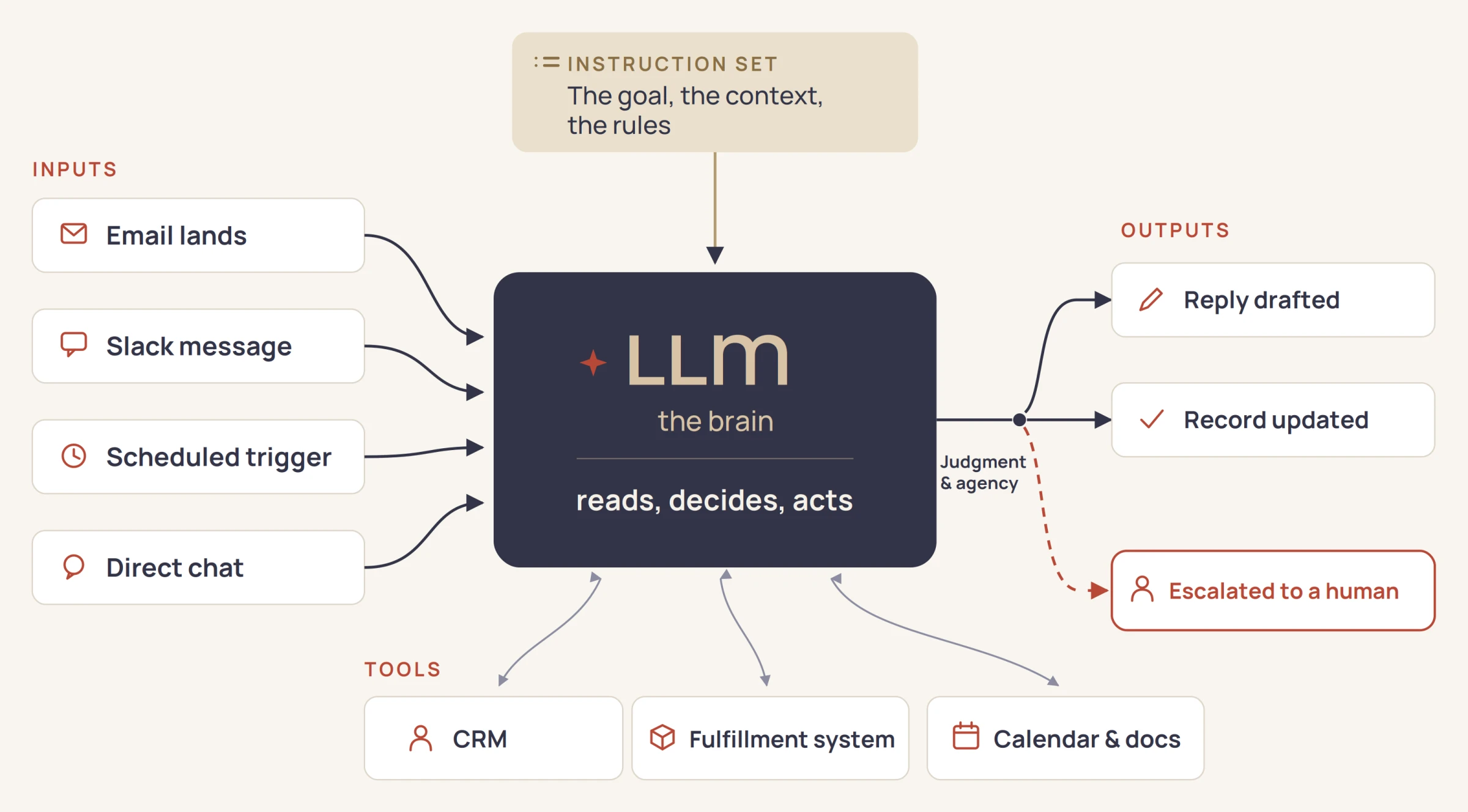
So here's the model I draw for clients. A large language model sits at the center, the brain. It takes in an instruction set: the goal, the context, the rules of the kitchen. It reaches for tools along the way, the same systems your team already works in. And it drives toward an output you defined, deciding the steps in between. That freedom to decide the steps is what makes it an agent and not just software.
Follow one email through the picture
A customer emails asking where their order is. That's the trigger, the left side of the diagram. Nobody scheduled this, the agent is simply watching the inbox.
The brain reads the email and starts making decisions. It reaches for tools: pulls the order from your fulfillment system, checks the customer's history in the CRM, sees this is a first-time buyer with an on-time shipment. It drafts a reply with the tracking link and an arrival date, logs the interaction, and moves on. Total elapsed time, under a minute. Nobody on your team touched it.
Now run a different email through the same picture. Same customer, but this time the order is three weeks late and the message has an edge to it. The agent reads the situation and makes a different call. It drafts nothing. It routes the thread to a human with the history attached, because it recognized this one needs a person.
Same agent, same instruction set, two different paths. That's the judgment we've been talking about. And notice the trigger could just as easily be a schedule, a Slack message, or a form on your website. The picture doesn't change. Only the entry point does.
This was possible before. That's not the point.
Workflow automation isn't new. For decades, businesses have wired up systems that move data, fire off emails, and update records without a human in the loop. So what changed?
Consider what the old way required. A developer had to write logic for every turn the workflow could take. Every possibility, spelled out in advance. What happens when the order number is missing? When the customer replies in another language? When the vendor changes their email format? Each of those needed its own coded branch, and the branches multiplied fast. The systems got bloated because they had to anticipate everything, and expensive because anticipating everything takes a lot of billable hours. When reality served up a case nobody had anticipated, the workflow broke, and you paid again.
That math kept serious automation out of reach for most small businesses. The workflows that would help you most, the messy ones full of judgment calls, were exactly the ones that cost the most to script.
Agents flip that math. The judgment calls no longer need to be written in advance, the brain makes them at runtime. You describe the goal and the rules once, and the agent handles the turns as they come. The messy workflows went from hardest to automate to first in line. Custom automation stopped being an enterprise budget item, and for a business your size, that's the headline.
The freedom is the feature
Strip this article down to one idea: what makes an agent an agent is the freedom to decide. Everything else is packaging. That freedom is why the messy workflows are finally automatable, and it's also why agents deserve more care than a typical software rollout. A tool with judgment needs good instructions, clear boundaries, and someone paying attention to how it behaves. The cook is talented. You still decide what's on the menu.
None of this requires an enterprise budget or a technical team. It requires knowing where an agent belongs in your business, getting your operation ready for one, and building it with the right guardrails. That's the journey we walk with clients at SkyeStaq, any part of it or all of it. But start simpler than that: pick one workflow your team is tired of, and run it through the picture above.
Every article here is written to our AI standard. How we use AI →